How has this exchange rate moved?
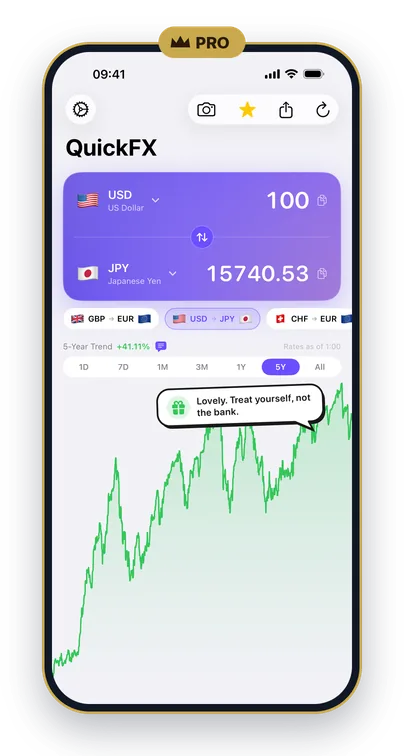
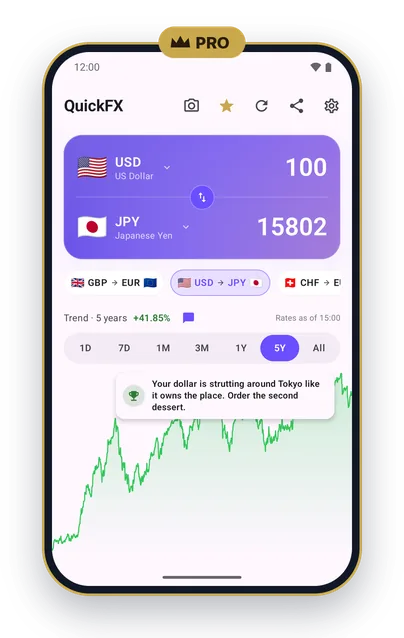
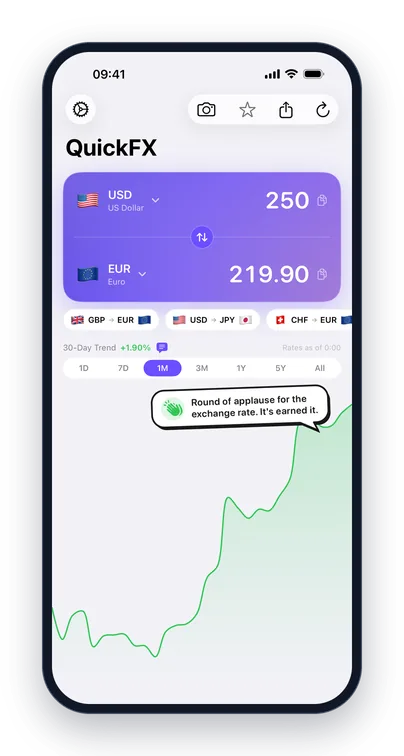
QuickFX shows a chart of the pair you're converting, right under the converter. The last day, week and month are free. QuickFX Pro goes back three months, one year, five years or all the way. You see how much the rate has changed over the period, and where today's rate sits between the period's high and low.
How to see an exchange rate's history
- Pick your two currencies in the converter, for example euro and Swiss franc, or tap one of your pinned pairs.
- Tap a period under the converter. 1D, 7D and 1M are free; 3M, 1Y, 5Y and All come with QuickFX Pro.
- Read the chart. The line above it gives the change over the period in per cent, and the time on the right shows when the rates were set. Rates are updated every hour.
What the chart tip says
A speech bubble on the chart sums up where today's rate sits within the period you're looking at, from the top of its range to the bottom, with a bit of humour. Near the top you might read "Round of applause for the exchange rate. It's earned it." The tip only looks back. It doesn't forecast, and it doesn't tell you when to change money.
On iPhone the tips speak eight languages, German and French among them. On Android the speech bubble is in English. With QuickFX Pro you can switch the tips off in Settings.
On Android, tap a chart for the full view, with the high, low and average for the period.
What's free and what's Pro
The converter is free and always will be: 160+ currencies, rates updated every hour, a chart of the last month with its tip, widgets and rate alerts. Longer charts come with QuickFX Pro, a yearly subscription on iPhone and Android, along with the price scanner, your card's fee and ten colours for the converter. There are no ads and no account, with or without Pro.
QuickFX is free to download. Add QuickFX Pro to look back five years and further.
Free · iPhone (iOS 17 or later) · Android (8.0 or later) · QuickFX Pro is a yearly subscription
Frequently asked questions
How far back can I see an exchange rate in QuickFX?
The last day, week and month are free. QuickFX Pro adds three months, one year, five years and all the way back.
Can QuickFX tell me whether a rate will go up?
No. The chart shows how a rate has moved, and the tip says where today's rate sits within that period. Neither looks ahead.
Is the chart tip in my language?
On iPhone, the tips speak eight languages, including German and French. On Android the speech bubble is in English.
Are the longer charts free?
They're part of QuickFX Pro, a yearly subscription on iPhone and Android. The converter and the last month's chart are free.
Everything else QuickFX does →
More QuickFX Pro: Card fee · Price scanner